




Benefits of GPU Accelerator

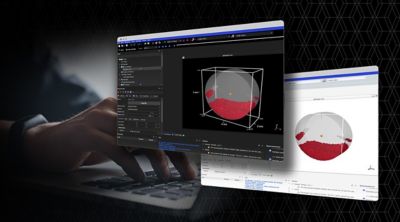
GPU Accelerator allows users to speed up overall solution times by performing some of the computation on supported graphics cards.  In this heterogenous computing environment, most of the work is performed on the CPU cores, but some computationally-expensive calculations are offloaded to the GPU cores.  While a typical workstation may have 8-12 CPU cores, high-end graphics cards have hundreds of GPU cores, so using these GPU cores can decrease calculation times significantly.For example, a 2 million DOF cyclic symmetry modal analysis (mesh of sector on left, expanded results on right) was performed on a Dell Precision T5500 workstation.  With GPU Accelerator, the solution using 2 CPU cores decreased by a factor of 3.7!

GPU Accelerator supports the sparse direct, PCG iterative, and JCG iterative equation solvers.  The user must be running 64-bit Windows or Linux and have a supported graphics card (currently, only NVIDIA Tesla series or Quadro 6000 cards are supported).  Lastly, an ANSYS HPC Pack license is required to enable 1 GPU as well as up to 8 CPU cores for a given calculation.

Here are some tips to see the greatest benefit when using GPU Accelerator:

  • When using the sparse direct solver, ensure that the solution runs in-core (in physical RAM).  The solver output will indicate which mode (in-core vs. out-of-core) was used for the solution, along with memory requirements for both.  If the workstation has enough physical RAM to solve in-core, but the solver chose to run in out-of-core mode, use the APDL command BCSOPTION,,INCORE to force an in-core solution.
  • The PCG solver has various levels for the preconditioner (this is controlled with the APDL command PCGOPT,Lev_Diff).  GPU Accelerator tends to show much better speedup with levels 1-2 rather than levels 3-4.
  • The Block Lanczos, PCG Lanczos, QR Damped, Damped, and Unsymmetric eigensolvers rely on the same equation solvers that are supported by GPU Accelerator, so these eigenvalue extraction methods will also see significant speedup.
  • Distributed ANSYS supports GPU Accelerator at 14.0 with 1 GPU used per machine.  Using Distributed ANSYS with multiple machines, each with its own supported graphics card, can greatly improve performance.
  • If using GPU Accelerator remotely, the TCC (Tesla Compute Cluster) Mode of the NVIDIA Driver must be installed.  Please see the NVIDIA Driver’s Release Notes, Appendix B, for more details.

Additional details on GPU Accelerator can be found in the ANSYS 14.0 Help, under the following Mechanical APDL help section: // Parallel Processing Guide // 3. GPU Accelerator Capability

GPU Accelerator provides analysts with extra power in solving large models on their workstation, so users do not have to rely solely on computing clusters to reduce the solution time.

8 thoughts on “Benefits of GPU Accelerator

  1. Pingback: Alexander Rubiano Pedraza » Benefits of GPU Accelerator

    • Hi Alok,

      The details of the implementation are not made public, but it’s worth noting that we will plan on support AMD(ATI) cards in future releases for GPU Accelerator, not just NVIDIA cards.

      Regards,
      Sheldon

      • many thanks for your note -sounds very interesting:
        can you tell something on the timetable for the support of AMD GPU cards? Do we have to wait for Ansys V15?

        Since AMD – in contrast to nvidia -do not cut the DP-Performance of their “consumer cards” (at the moment): will their be support for their “consumer cards” like 7970?

        • We are tentatively planning on supporting AMD cards for GPU Accelerator in 14.5. We will provide a list of supported AMD cards at the time of 14.5 release.

  2. Hi Sheldon,
    I am just recently researching on GPUs and the performance improvements. So far, I have only encountered articles about the use of GPUs in parallel processing for ANSYS Mechanical ADPL and I wonder if this feature is also enabled on ANSYS CFX or Fluent.

    • Right now, there is a beta feature in ANSYS FLUENT 14.0 to allow radiation viewfactor calculations on GPUs. Please contact your local ANSYS Technical Support for more details.

Comments are closed.